
Audit-Readiness Workflows: How Compliance and Operations Teams Use Permissions & Audit
A practical look at how compliance and operations teams can use attributable change history in Permissions & Audit to investigate incidents, confirm changes, and put together an audit report.

Audit readiness is usually treated as a once-a-quarter scramble: pull logs from several systems, reconcile timestamps, and hope the people involved remember the context. That approach is slow, error-prone, and falls apart the moment an incident requires answers in minutes rather than days.
Permissions & Audit removes the scramble by capturing change history as a normal part of how the product works, not as a bolt-on reporting layer. This post walks through what attributable change history actually contains, how operations and compliance reviewers can use it day to day, and where to go for the supporting checklists and the core launch overview.
What "Attributable Change History" Actually Means
Every flag evaluation change, configuration write, and permission modification in Zenmanage is recorded with three things attached:
- Actor identity: exactly who made the change, not a shared service account or a generic "system" entry.
- Timestamp: when the change happened, in a record that cannot be edited after the fact.
- Environment context: which project and environment the change applied to, so a staging tweak is never confused with a production change.
That combination is what turns a log into an investigation tool. "Someone changed the rollout percentage on Tuesday" is not useful during an incident review. "Person X changed the rollout percentage from 25% to 100% on the production environment of the checkout project at 2:14 PM" is.
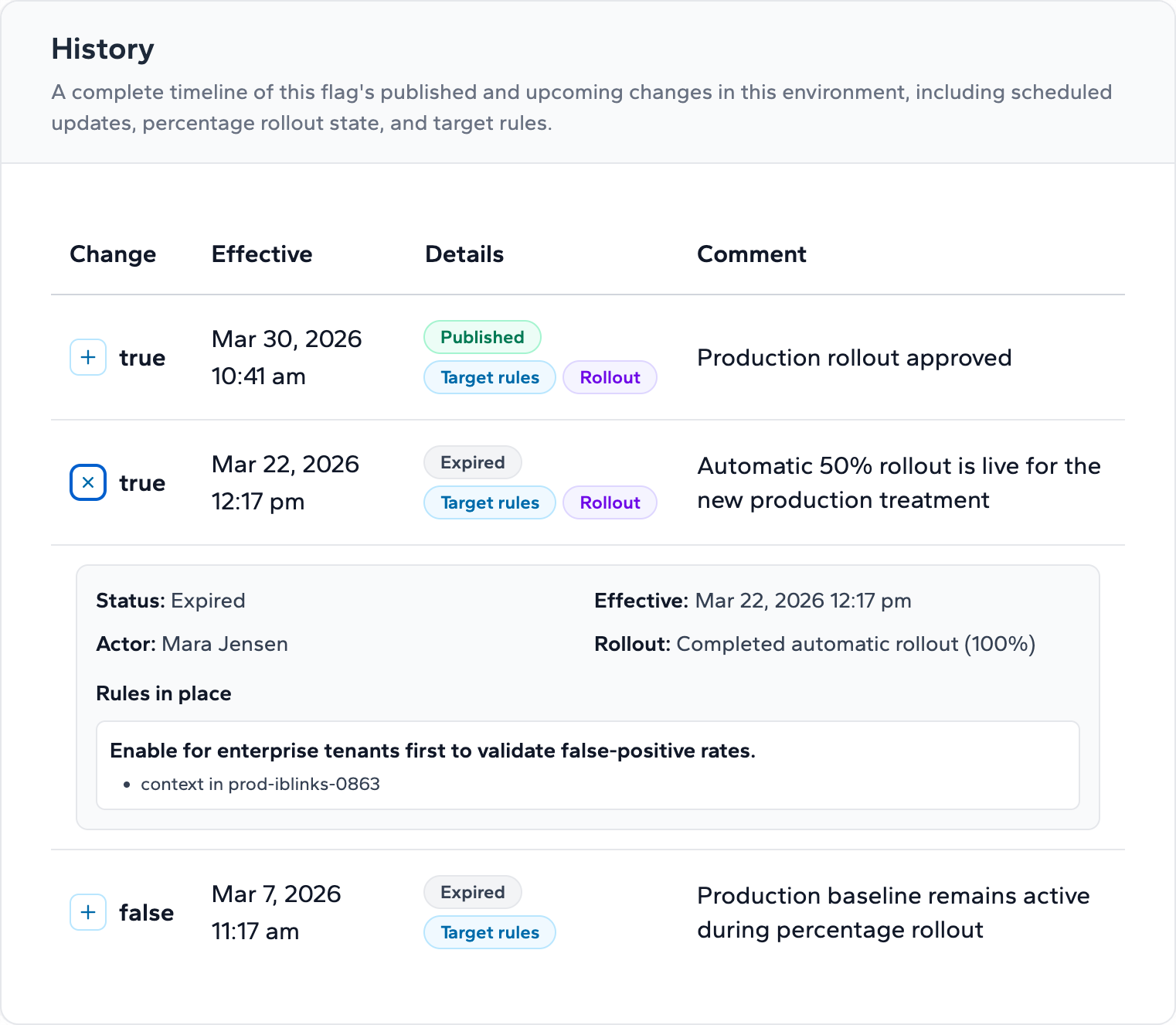
Review Workflow 1: Reconstructing an Incident Timeline
When something breaks in production, the first questions are almost always about sequence and ownership. A practical investigation flow looks like this:
- Anchor on the incident window. Start from the time the issue was detected and look backward through the change history for the affected project and environment.
- Identify the candidate changes. Filter to configuration writes, flag evaluation changes, and permission updates that occurred in that window.
- Confirm actor and scope. For each candidate change, the record shows who made it and at what scope — account, project, or environment — so you can rule out unrelated changes quickly.
- Build the timeline. Order the confirmed changes chronologically to produce a sequence reviewers can rely on without cross-referencing other systems.
Because the record is immutable, the timeline you build during a review is the same one anyone else would build from the same data. There is no risk of the trail being edited after the fact, which matters as much for internal trust as it does for external reporting.
Review Workflow 2: Confirming a Specific Change
Not every review starts from an incident. Sometimes the question is narrower: did a specific change happen, who made it, and was it within their scope? That confirmation flow is straightforward:
- Locate the change. Search the change history by project, environment, or time range to find the specific event in question.
- Verify the actor's permissions at that time. Cross-check the actor against the scoped role they held, confirming the change was within their account, project, or environment boundary.
- Document the finding. Because the record includes actor, timestamp, and scope in one place, the confirmation can be captured and reported without assembling evidence from multiple sources.
This is the kind of check that used to take an afternoon of cross-referencing access lists against deploy logs. With attributable history, it is a lookup.
Review Workflow 3: Release Traceability for Audit Reporting
Audit reporting asks a different question than incident response: not "what went wrong," but "can we demonstrate that changes followed our process over a period of time." The traceability flow supports that directly:
- Define the reporting window and scope. Pick the period and the projects or environments the report needs to cover — typically production environments carrying customer impact.
- Pull the change set. Gather every configuration write, flag change, and permission modification in that window, each already attributed to an actor and scope.
- Map changes to roles. Confirm that production-sensitive changes were made by the roles your access policy designates for that responsibility.
- Compile the record. Because each entry already has actor, timestamp, and scope, the report is an export and summary exercise rather than a reconstruction project.
The result is a release record that holds up under review — not because someone assembled it carefully after the fact, but because the system captured it correctly the first time.
Where Permissions Fit Into Audit Readiness
Change history is most useful when it is paired with scoped access. Permissions & Audit grants access at the account, project, or environment level, and lets teams restrict production-sensitive operations — enabling flags, changing rollout percentages, writing environment configuration — to specific roles.
For an operations or compliance reviewer, that scoping is what makes the audit trail meaningful rather than just complete. A complete log of who could have made any change is a haystack. A log of who actually had the scope to make a given change, paired with a record of who did make it, is an answer.
A Note on Scope
Permissions & Audit gives your team the attributable data and scoped controls that audit-readiness work depends on. It is a record-keeping and access-control capability, not a compliance certification or a legal opinion about your obligations under any specific regulatory framework. Treat the workflows above as a starting point for your own review process, and involve your compliance function in deciding how the underlying data maps to your specific reporting requirements.
Where to Go Next
- Permissions & Audit Is Live - the launch overview covering scoped permissions, production-sensitive controls, and immutable audit history.
- Audit History Guide - step-by-step guidance for investigating incidents and reconstructing release timelines.
- Permissions & Audit Adoption Checklist - a rollout checklist for assessing current access and hardening production environments.
- Governance Checklist - keeping flags and changes controlled, reviewable, and removable over time.