
Capability
Progressive Rollouts
Roll features out gradually, measure impact as traffic expands, and avoid all-at-once launches that raise risk.
Why roll out gradually
Big-bang releases are risky. When you deploy a feature to 100% of traffic immediately, a bug in that feature affects 100% of your users. If response times degrade, every customer sees slowness. If the logic is wrong, everyone gets the wrong behavior until you can redeploy a fix.
Progressive rollouts reduce blast radius by exposing features gradually. Start with 1% of traffic, observe error rates and performance metrics, then ramp to 10%, 25%, 50%, and eventually 100%. Each step is a checkpoint where you can pause, measure, and gain confidence before expanding.
Zenmanage implements percentage-based rollouts with deterministic hashing. Each user gets a consistent result at a given percentage — if you're in the rollout at 5%, you stay in the rollout as it ramps to 50%. This prevents experience flickering and ensures reliable cohort consistency. Change the percentage in the dashboard and connected services see the new value immediately, with no redeployment required.
Key capabilities
-
Percentage ramps
Set a rollout percentage and increase it over time - Zenmanage's deterministic hashing keeps each context in the same bucket as the percentage grows.
-
Cohort consistency
Users who qualified at 5% still qualify at 50% - deterministic evaluation prevents experience flickering during ramp-up.
-
Combined with targeting
Layer percentage rollouts on top of segment rules to roll out to 10% of enterprise users or 50% of beta testers.
-
Per-environment rollouts
Run a 100% rollout in staging while keeping production at 5% - each environment has independent targeting.
-
Instant rollback
If metrics degrade, drop the percentage to 0% or flip the kill switch - no deploy required, immediate effect.
See it in action
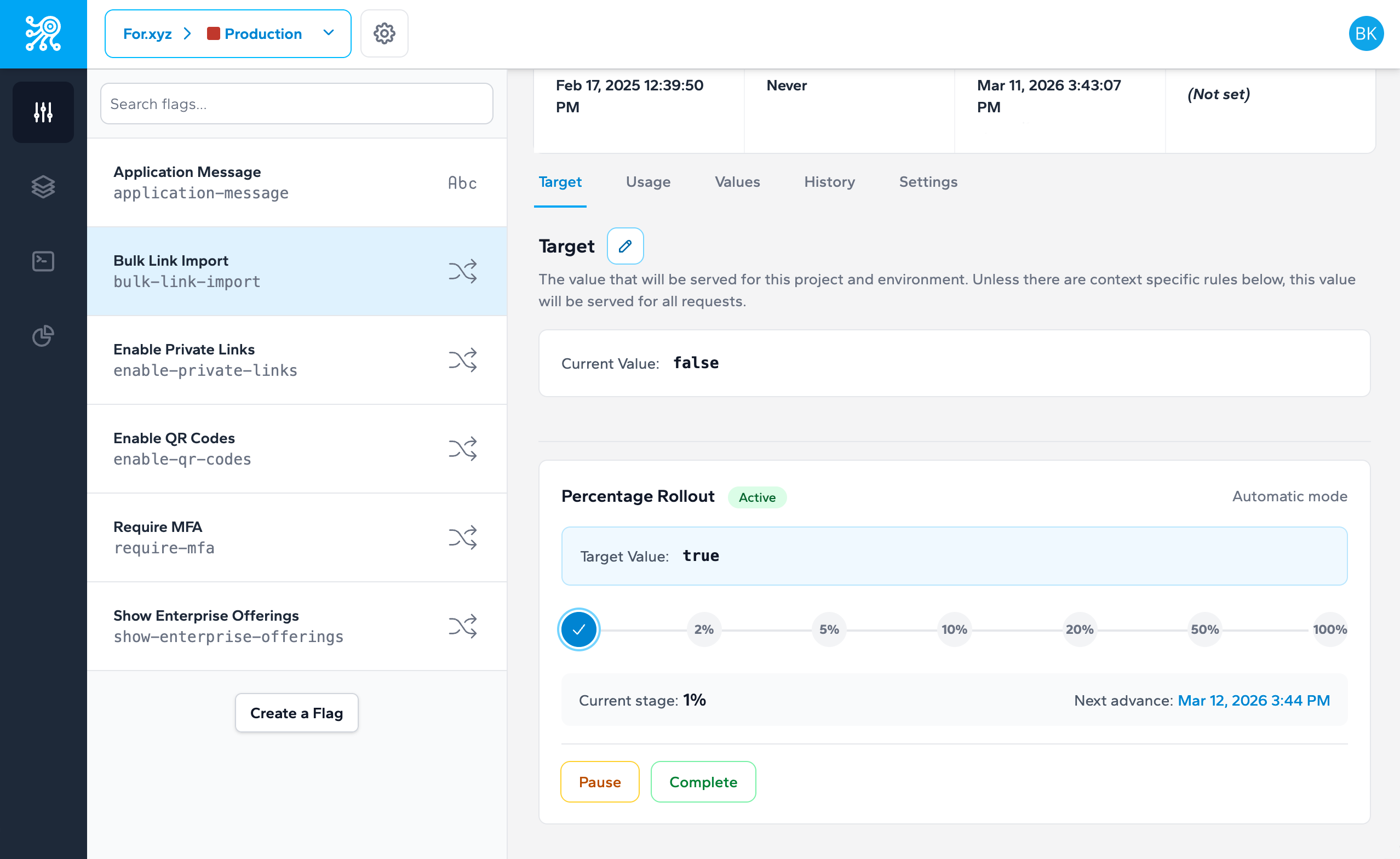
Configure percentage-based rollouts per target rule — start small, observe, and ramp with confidence.
// Same user always gets the same result at a given percentage
const variant = await client.getValue('new-dashboard', {
  type: 'user',
  identifier: 'user-8291'
});
// → Returns 'enabled' consistently while user is in the rollout bucket
Related capabilities
-
Targeting and Segments
Define the audience for your rollout
-
Feature Flags
Create the flag that powers the rollout
Launch with confidence, not crossed fingers
Progressive rollouts reduce blast radius and let you measure impact at every step.