
Target Rules and Value Overrides: Layer Your Rollout Without Guessing Who Gets What
A flag has one target value and any number of rules that override it. Here is how rules map to override values, how to layer them from precise to broad, and how to debug two rules that disagree.

That's the job target rules do. A rule says "for this audience, serve this value instead." Stack a few of them on one flag and you can run a staged rollout without creating a flag per audience or shipping a code change per stage. The catch is that rules interact, and the way they interact is simple enough to get wrong when you're moving fast. This post covers the model, a layered way to use it, and how to work out why a user got the value they did.
How Rules Map to Override Values
Every flag in an environment has a target value. That's what the flag serves when nothing more specific applies. Rules sit on top of it. Each rule is a pair: a condition on the way in, and a served value on the way out. When a rule's condition matches the context you're evaluating, its served value replaces the target value. That replacement is the override.
A rule's condition has three parts:
- A selector that says what you're matching on: a segment, a single context by identifier, or an attribute such as
planorcountry. - A comparer such as equals, is in, contains, or greater than.
- The values to compare against.
A rule has one condition. If you need two conditions to both be true, you don't stack them inside one rule. You order your rules so the more specific audience is checked first, which is the next section's subject.
Evaluation is the part to hold on to. Zenmanage checks a target's rules from the top of the list to the bottom and stops at the first rule that matches. That rule's served value wins. If no rule matches, or the SDK call carries no context at all, the flag serves the target value. A rule never combines with the one below it, and a later rule can't take a value back from an earlier one.
Rules belong to a target, and a target belongs to one flag in one environment. So the rules you write for staging don't touch production, and like any target change, they're edited in a draft and only apply once you publish. The targets post covers that lifecycle.
Building a Layered Rollout Strategy
First-match-wins gives you a natural way to lay a flag out. Think of it as three layers, and read it from the top of the rule list down:
- Precise overrides at the top. Specific people and small, deliberate groups: your internal testers, one customer who's piloting the change, an account that needs the old behavior for a contract reason.
- Broad rules in the middle. Wider audiences defined by a shared trait, like a beta segment or everyone on a particular plan.
- The target value at the bottom. It isn't a rule at all. It's the floor everyone else lands on, and the one you'll eventually change when the rollout is done.
The order matters because a broad rule above a precise one swallows it. If "all enterprise accounts" sits above "this one enterprise account that needs the old behavior," the specific rule never gets a chance. Put the narrow condition first, the wide one under it, and the default underneath both.
This also gives you a clean way to finish. A staged rollout is mostly a sequence of edits to the same short list, and the last step is boring: you change the target value so everyone gets the new behavior, then delete the rules that were carrying the exceptions. The segment-first launch strategy post covers how to decide which audience goes in which stage.
Combining Segment and Attribute Rules Safely
You'll mostly reach for two selectors, and they suit different jobs.
A segment is a named group of contexts you define once and reuse across flags. Use one when the audience is a deliberate list with an identity: "internal testers," "design partners," "accounts in the migration." Membership is something you manage. A context is in the segment because you put it there.
An attribute rule matches on something your application sends with each evaluation, such as plan, country, or app_version. Use one when the audience is a trait that changes by itself. Nobody has to keep a list current. A customer who upgrades their plan starts matching the rule on the next evaluation.
Mixing them in one target is fine and usually what you want: a segment rule on top for the groups you chose, and attribute rules below for the groups the data defines. A few habits keep that safe:
- Keep each rule about one thing. Give it a description that says who it's for and why, such as "Internal testers: new checkout." You'll read that description when something surprises you.
- Be careful with negative comparers. A rule like
planis not equal toenterprisealso matches a context that has noplanattribute at all. If your SDK call leaves attributes out, those contexts get the override. Pair a negative rule with a rule above it that catches the missing case, or write the positive version instead. - Send the same attributes everywhere. A rule can only match on what the evaluation carries. If the web app sends
countryand the mobile app doesn't, the same user gets different values on each. - Give each override a reason to exist. A rule that nobody can explain is a rule nobody will delete.
An End-to-End Example
Say you're replacing a single-page checkout with an express layout. The flag is a string called checkout-layout, and it can serve single-page or express. In production it currently serves single-page to everyone. You want express to reach your own team first, then your beta customers, then everybody.
Stage 1: your own team
Start a draft of the flag's target. Leave the target value as single-page, and add one rule: segment is internal-testers, served value express. Publish it. Your team sees the new layout in production, against real data, and nobody else notices.
Stage 2: beta customers
A week later, draft again and add a second rule below the first: segment is beta-customers, served value express. The internal rule stays on top. Publish. You now have a layered target, and this is what it looks like in the dashboard:
A target with two override rules
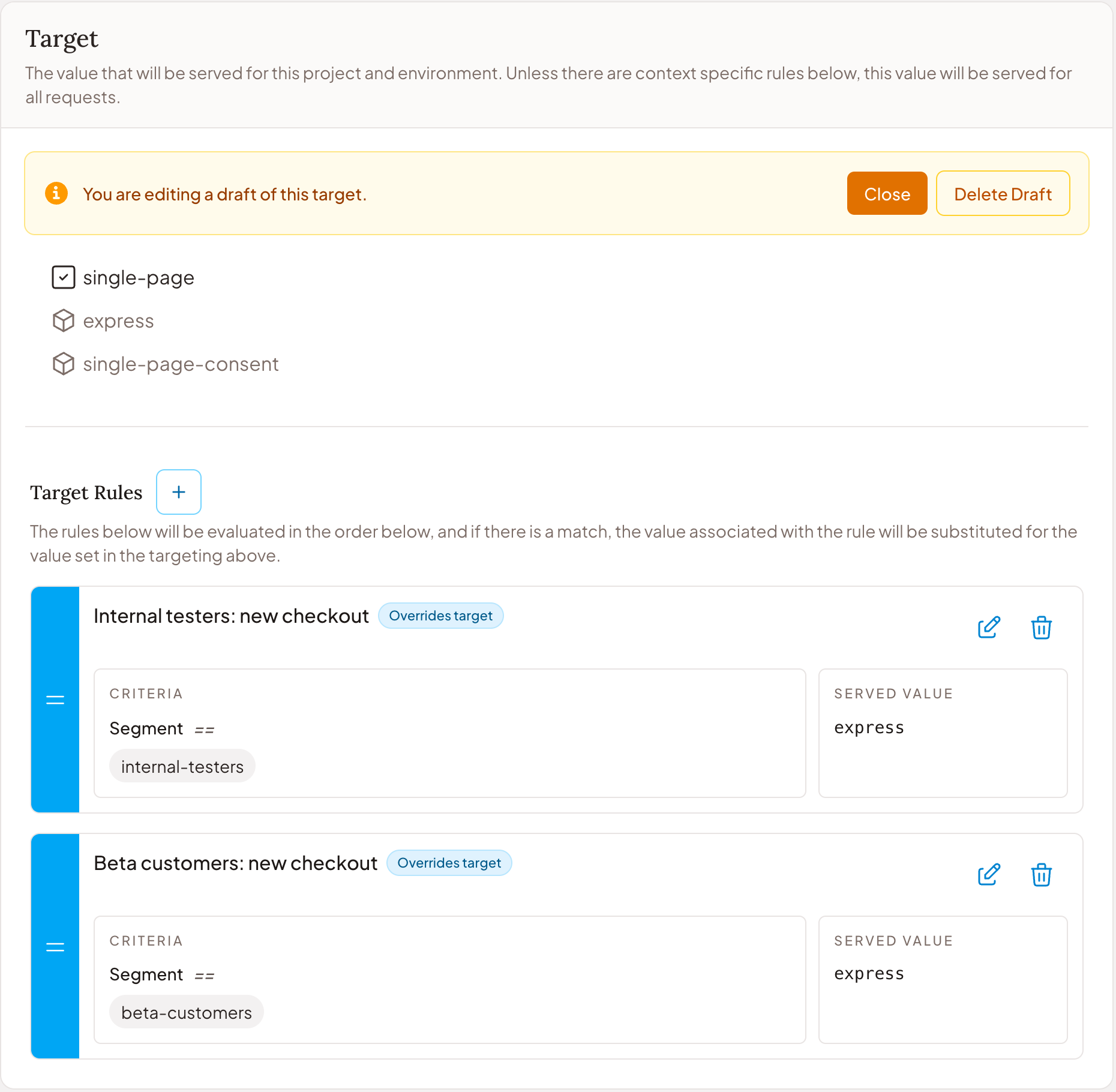
Here's what your application gets back for a few different users. The call is the same every time. Only the context changes.
const layout = await client.getValue('checkout-layout', {
  type: 'user',
  identifier: user.id,
  attributes: { plan: user.plan, country: user.country }
});| Who | Matches | Served |
|---|---|---|
| A teammate in internal-testers | Rule 1, and evaluation stops | express |
| A customer in beta-customers | Rule 2 | express |
| Any other customer | No rule, so the target value | single-page |
| A call with no context | Rules are skipped, so the target value | single-page |
Stage 3: everyone
When the beta looks clean, draft once more. Change the target value to express, delete both rules, and publish. Every context now lands on the floor, and the floor is the new layout. You didn't flip a rule. You promoted the value, and the exceptions stopped being exceptions. If you want that last step to be gradual, put a percentage rollout on the final target instead of switching it all at once.
Troubleshooting Conflicting Rules
Most "that user got the wrong value" reports come down to one of a handful of causes. Work through them in this order.
Two rules match, and the wrong one is first
This is the common one. Suppose a German compliance review means customers in Germany need the single-page layout with an extra consent step, which you serve as single-page-consent. You add a rule: attribute country is equal to DE, served value single-page-consent. You put it at the bottom, under the two beta rules. Then a German customer who's in beta-customers reports they're seeing the express layout. They match rule 2 first, rule 2 wins, and the country rule never runs.
The fix isn't a new condition. It's the order. Draft the target and drag the country rule above the beta rules, so the narrower exception is checked first. Publish, and the same customer gets single-page-consent. Rule order is part of the target, so reordering is a change like any other: you make it in a draft, and it only applies once you publish.
The rule never matches
If a rule you expect to fire never does, check what the evaluation actually carried before you check the rule. The attribute might be named Plan in your code and plan in the rule. The value might be sent as "Enterprise" while the rule compares with enterprise. The SDK call might not pass a context at all, in which case no rule is evaluated and you get the target value. The Debug Console in the dashboard shows evaluations as they arrive, along with the context and attributes each one carried, which is usually enough to spot the mismatch.
A negative rule that matches too much
A rule that says plan is not equal to enterprise matches every context that doesn't have a plan attribute, including anonymous visitors and service accounts. If that's not what you meant, put a rule above it that handles the missing case, or invert the logic and match the plans you do want.
Checking your work
When a report lands, ask the same four questions every time. What context did the evaluation send? Which rules does that context match, reading top to bottom? Which of those is first? And if none match, what is the target value? You can answer all four from the rule list and the Debug Console without touching code. Write the answer into the rule's description once you've found it, and you won't need to ask again.
Keep the List Short
Rules are cheap to add, which is exactly why lists get long. A flag with twelve overrides is a flag nobody can reason about. Treat each rule as temporary unless you can name the reason it's permanent. When a stage of the rollout is over, fold its audience into the target value and delete the rule. A short list with the narrowest rules on top, the broadest below, and a target value you trust underneath is easy to read and easy to debug.