
Projects and Environments: Structure Your Flags for Scale
How Zenmanage's project and environment model keeps flag sprawl in check, and a practical walkthrough for mapping projects, environments, and keys to your release workflow.

You've seen the flag list that's grown past the point anyone fully understands it. Some flags are from a launch two quarters ago. Some are experiments nobody remembers the outcome of. A few control production behavior that would break something if you touched them, and nothing in the list tells you which ones those are. Nobody deletes anything, because nobody's sure what's still load-bearing.
That's not a flag-naming problem. It's a structure problem. Zenmanage separates flags along two axes — project and environment — specifically so a team's flags don't have to share a list with another team's, and a staging change can't accidentally reach production. Get that structure right early, and the flag list stays legible even as it grows. Get it wrong, and no amount of naming convention will save you.
The Mental Model
Zenmanage organizes everything in a fixed hierarchy: your account contains projects, each project contains environments, and each environment holds its own independent set of flags.
- Account — the org-wide container. Billing, account-level roles, and the list of projects all live here.
- Project — a scope for one product, service, or team. Flags created in one project are invisible to every other project — there's no shared namespace to collide with.
- Environment — a scope inside a project, typically one per stage of your release pipeline. Each environment evaluates flags completely independently, with its own targets, rules, and keys.
- Flag — the thing you actually toggle, defined once at the project level but given a separate value, targets, and rollout state in every environment.
The part that matters operationally: environment isolation is real isolation, not a filter on top of one shared flag list. A change in staging cannot leak into production because production is reading from a completely separate set of targets and rules. That's what makes it safe to test loudly in one environment without thinking about what it might do to another.
Access follows the same hierarchy. Every permission in Zenmanage comes from a grant — a role attached to a scope, held by a person or a team — and grants are set at the account, project, or environment level, inheriting downward. A role granted at the project level applies to every environment inside it unless something narrower overrides it; a role granted only at the environment level stays contained to that one environment. That's what makes "give this contractor write access to staging only" a normal, one-step request instead of a workaround. For the full permission model, see Roles, Grants, and Teams.
Mapping Environments to Your Release Workflow
Most projects need fewer environments than teams assume. The default that works for the large majority of teams is a simple two-stage pipeline: a non-production environment where you validate context shape, fallback values, and targeting rules, and a production environment that serves real traffic.
- Staging (or development): where new flags get created, targets get tested against synthetic or internal contexts, and rollouts get rehearsed before anyone outside the team sees them.
- Production: where flags serve real users. Nothing here changes as a side effect of what happens in staging — every target, rule, and rollout is configured deliberately, in this environment, on purpose.
Add a third environment when you have a genuine reason for one — a QA environment that mirrors a specific test harness, a pre-production environment that sits in front of a staged deployment pipeline, a dedicated environment for a partner's isolated instance. Each of those is a real reason. "We might want more separation eventually" isn't — you can add an environment the day you actually need it, and starting with two keeps the flag list, the key management, and the access grants simple while you don't.
The same logic applies to projects. Split by project when two things genuinely don't share flags, an audience, or a release cadence — a separate mobile app, a separate internal admin tool, a separate product line. Don't split by team if the team ships one product; that's what environment-level access grants are for. More projects means more places to keep environment naming and structure consistent, and that consistency is worth protecting.
Keys and Evaluation
Every environment issues three keys, and each one is scoped to that environment only — a staging key can't evaluate a production flag, and a production key can't touch staging. These keys are what your SDKs and API calls authenticate with, functioning as the environment's access token:
- Server key: for backend services and server-side SDKs.
- Mobile key: for mobile SDK delivery.
- Client key: for browser and other client-side SDK delivery.
Match the key type to where evaluation actually happens. A server key belongs in backend configuration or secret storage — never in code that ships to a browser or a mobile app, since anything bundled client-side is visible to anyone who inspects the bundle. Client and mobile keys are built for exactly that exposure: they're scoped narrowly enough that shipping them to an end-user device is the intended usage, not a leak.
# Server runtime — keep this in secret storage, never in client-shipped code
export ZENMANAGE_SERVER_KEY="tok_your_server_key_here"

# Browser runtime — scoped for client-side exposure by design
export VITE_ZENMANAGE_CLIENT_KEY="tok_your_client_key_here"
Treat all three like credentials regardless of which one is meant to be public-facing: generate separate keys per environment, and if one is ever exposed somewhere it shouldn't be, rotate it rather than assume the blast radius is contained. Because evaluation is scoped per environment, rotating a staging key never touches production traffic.
Walkthrough: Set Up a Staging and Production Structure
Here's the whole setup, start to finish.
- Create a project. From your account, create a new project for the product or service whose flags you're about to manage. Give it a name that describes what it contains, not who owns it — teams change, the project's purpose usually doesn't.
- Add your environments. Most projects start with exactly two:
stagingandproduction. Name them for the stage they represent, not the infrastructure behind them — infrastructure changes more often than the release stage it's standing in for. - Copy the right key into each runtime. Open each environment and copy its server, mobile, or client key into the matching runtime's configuration — staging keys into your staging deployment, production keys into production. Never share a key across environments.
- Set grants deliberately. Decide who gets editor access to production versus staging before anyone starts changing flags. Project-level access is fine for most contributors; reserve environment-scoped grants for cases where someone needs staging access but shouldn't touch production yet.
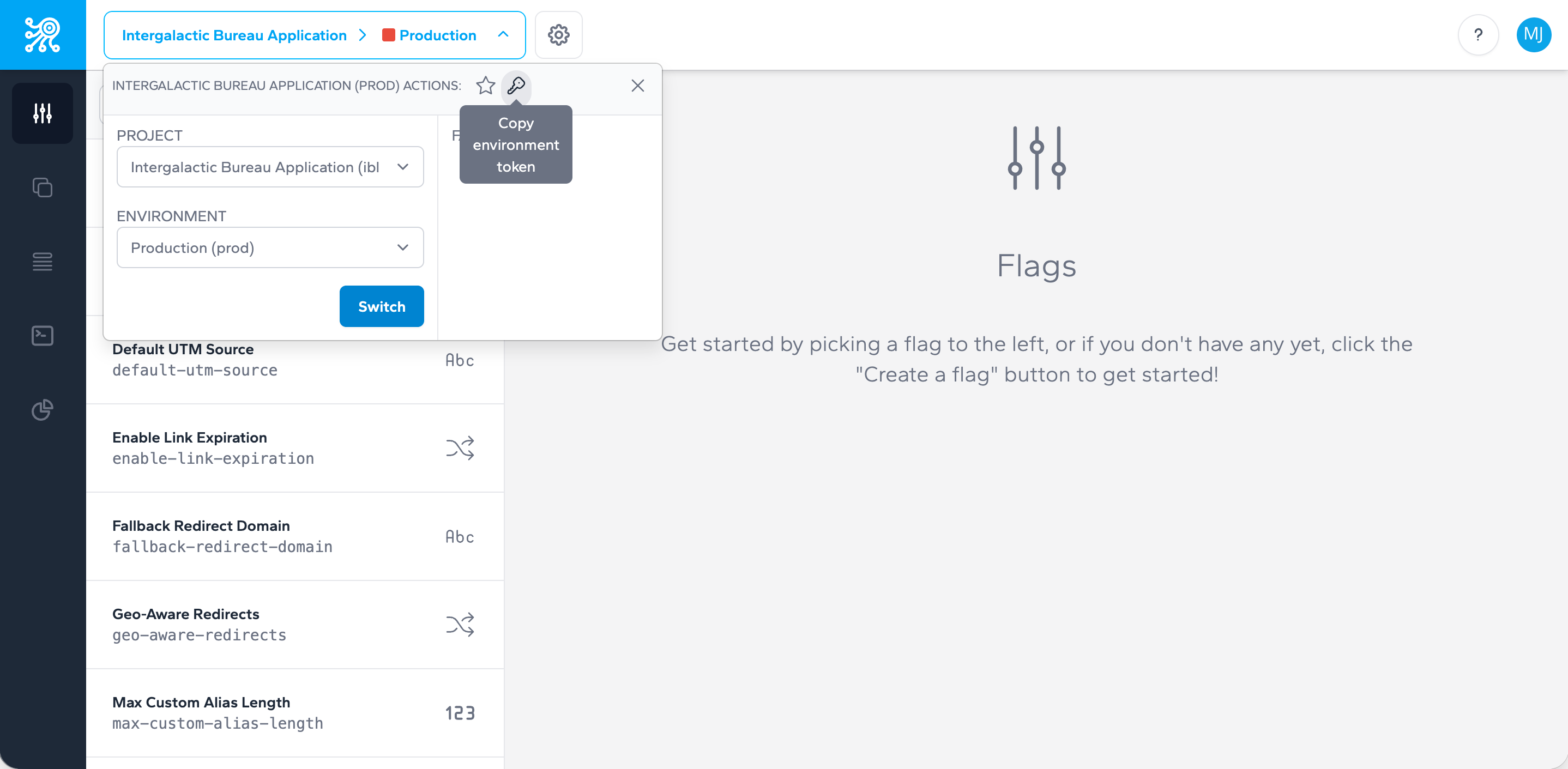
From here, everything else — flags, targets, rollouts, webhooks — is scoped automatically to whichever environment you're working in. The full sequence, including your first flag and first evaluation call, is covered step by step in Getting Started.
Common Pitfalls
A handful of mistakes account for most of the flag sprawl teams eventually have to clean up. They're all avoidable at setup time.
- Vague or infrastructure-tied naming. Naming an environment after a server, a region, or a temporary deployment target instead of the release stage it represents makes the structure fragile — the day the infrastructure changes, the name lies about what the environment actually is.
- Over-nesting. Creating a new project for every team or a new environment for every feature branch turns a two-level hierarchy into something nobody can hold in their head. Split only when flags, audience, or cadence genuinely don't overlap.
- Key exposure. Hard-coding a server key directly in application code, committing it to a repository, or reusing a production key in a non-production runtime are the fastest ways to lose the isolation the environment model is supposed to give you. Keep keys in configuration or secret storage, scoped one-to-one with the environment they belong to.
- Loose access hygiene. Granting broad account- or project-level admin access by default, instead of scoping grants to what each person actually needs, erodes the safety of the environment boundary from the access side rather than the key side. The Scoped Permissions Setup Guide walks through setting this up deliberately at each scope.
None of these are hard to avoid. They're just easy to skip when a project starts small and "we'll clean it up later" feels safe. The cost shows up months later, in the flag list nobody fully understands.